



Norton is a market giant in the antivirus industry, but it has expanded into the VPN market in recent years as Norton VPN. It’s a VPN that’s designed for everyday privacy while browsing and bypassing geo-restrictions.
But how does it stack up against established VPN giants, like NordVPN or ExpressVPN? To find that out, I ran hands-on tests to identify leaks, examined its features, evaluated how well it bypasses geo-blocks on streaming platforms, and more.
Keep reading this Norton VPN review to find out where it succeeds, where it falls short, and whether it’s worth your money in 2026.
TL;DR: Norton VPN quick overview
|
Number of servers |
Servers in 67 countries |
|
Location |
The US (14-Eyes member) |
|
Encryption |
AES-256 (bank-grade) encryption |
|
VPN protocols |
WireGuard, Mimic, OpenVPN |
|
Torrenting (Dedicated P2P servers) |
Yes |
|
Streaming capabilities |
Supports major platforms like Amazon Prime, Netflix, Disney+, Hulu, and more |
|
Logging |
No-log policy |
|
Lowest price |
Starting from $3.33/month |
|
Money-back guarantee |
60 days |
|
Website |
My verdict:
Norton VPN is a great VPN solution for everyday use, offering subscriptions suitable for both individual users and families. It comes with advanced security features, including malware protection, a privacy monitor, and dark web monitoring, providing a comprehensive security solution in a single app. However, its server network only offers 67 countries, and speeds could be better for streaming.

Norton VPN features
Norton VPN offers essential VPN features, such as a kill switch, split tunneling, and an ad blocker, with each plan. If you upgrade to more expensive plans, you get useful advanced features like a privacy monitor or dark web monitoring, which is useful if you care about where your personal data ends up.
The only features I lacked with Norton VPN were RAM-only servers and Smart DNS. While RAM-only servers ensure all data is wiped with each server reboot, Smart DNS is useful to ensure a smoother browsing experience.
You can read my insights about each Norton VPN feature I tried below.
Kill switch
Norton VPN has a kill switch on all major operating systems it supports, including Windows, macOS, Android, and iOS. A kill switch is a crucial security feature that all reputable VPNs offer.
It temporarily blocks all of your internet traffic if the VPN connection drops unexpectedly. This way, you can stay safe from accidental data leaks.
You can enable the kill switch by going to VPN Settings > VPN Preferences > Kill Switch.

I tested the kill switch in the usual cases when it activates, like switching networks. Once I switched from my work network to my mobile hotspot, the kill switch automatically activated. I got a message on the VPN app stating “Kill switch blocked your internet.”

I couldn’t access any web pages until I clicked Reconnect VPN and was successfully connected to the server.
Split tunneling
Split tunneling is another basic VPN feature that most high-quality services, including Norton VPN, employ. It allows you to choose which apps route traffic through the VPN and which ones use the regular internet connection.
You can enable split tunneling on Norton VPN by going to Settings > VPN Preferences > Split Tunneling.

I found this feature to be useful when I want to maintain better speeds on specific platforms. For example, I excluded Steam from connecting to a VPN so I could browse games uninterrupted and see prices in my own location.
Ad blocker
Norton VPN also offers an ad blocker, but only on its browser extension. It blocks ads to make your browsing experience safer since some ads can be phishing or malware in disguise.
You can enable it in one click straight from the browser extension’s dashboard.

If you go to the browser extension’s settings, you can also allow acceptable ads. This means that non-intrusive ads that offer some value won’t be blocked.
Malware and scam protection
You can get malware detection and scam protection with the more expensive Norton VPN plans – Plus and Ultimate. I liked that it includes auto-protect, meaning it scans your device for malware in real time.
Plus, it offers Safe Web, which is an AI-powered feature that blocks websites that appear malicious or scammy. I used WICAR.org to test how well this feature locates malware. Out of 13 malicious websites, it blocked 11, which is nearly 85%.

As soon as I opened a malicious site, Norton VPN prevented me from accessing the site. I could instantly view more details or simply turn off the notification and leave the site.
I also enjoyed that there’s the Download Intelligence feature, which analyzes downloaded files for malware, so you don’t infect your device unexpectedly. There’s also ransomware protection, so your folders are protected from unauthorized access.
Privacy monitor
One unique feature that Norton VPN offers is the Privacy Monitor. Once you activate it on your web account, it helps you find your personal data on data broker sites. This way, you can send opt-out requests and protect your information from prying eyes.
You can locate the Privacy Monitor feature in the “Privacy” section. Once you click Activate, you’ll be redirected to your web account. Here, you can insert your personal information, and Norton VPN will scan popular data broker sites to find your data.
During my test, Norton informed me that “109 data broker sites currently have your info for sale.” It showed me exactly what each data broker knows and allowed me to request removal from the same page, so securing my data was quick and easy.

Dark web monitoring
Norton VPN offers a dark web monitoring feature that scours the dark web to find if any of your information has been leaked. If it locates anything, it informs you so you can change your passwords or alert your credit card issuer.
You can find this feature in the “Identity” section of the Norton VPN app. However, to activate it and monitor any alerts, you’ll be redirected to your web account. I found it inconvenient to have to switch between the app and my web account, but I quickly got used to it.

Here, you can add multiple email addresses, home addresses, phone numbers, credit cards, bank accounts, gamer tags, passports, insurance, or even a driver’s license. What caught my eye was that you can add more than just one email address or phone number, so you can monitor data of your whole family.
Parental controls
The Norton VPN Ultimate plan is the best option for families because it has great parental control features. It’s a unique feature that you won’t get with many other VPNs.
Here are the main things you get with Norton VPN’s parental controls:
- Set screen time limits for your children
- Allow or block specific apps or websites
- Locate your child’s device in real time
To set it up, you’ll need to create a profile for your child and set restriction levels based on their age.

All you have to do is add your child, set restriction levels, and install the Norton Family app on their device.
Norton VPN pricing
Norton VPN offers 3 different plans – Standard, Plus, and Ultimate. All of them come with a kill switch, IP rotation, double VPN, and an ad blocker. Unlike with other VPNs, there are only yearly subscriptions available, so you won’t be able to subscribe for 2 or 3 years without renewal.
Here are the Norton VPN plans, their pricing, and main differences:
|
Standard |
Plus |
Ultimate |
|
|
Price per month |
$3.33/month |
$4.17/month |
$5/month |
|
Yearly price |
$39.99 |
$49.99 |
$59.99 |
|
Devices |
5 |
5 |
10 |
|
Scam detection |
❌ |
✅ |
✅ |
|
Real-time malware protection |
❌ |
✅ |
✅ |
|
Password manager |
❌ |
✅ |
✅ |
|
Dark web monitoring |
❌ |
✅ |
✅ |
|
Cloud Backup |
❌ |
10 GB |
50 GB |
|
Parental controls |
❌ |
❌ |
✅ |
The Standard Norton VPN plan comes at $39.99 for the first year and renews at $79.99. It’s a basic plan for 5 devices that offers the privacy of a VPN with essential features.
Meanwhile, the Plus plan works out as $49.99 for the first year and renews at $109.99. I’d get the Plus plan if I were looking for an all-rounded security solution. It comes with malware protection, a VPN, a password manager, and 10 GB of cloud backup.
If 5 devices aren’t enough, I’d recommend getting the Ultimate plan instead of purchasing two separate Plus subscriptions with different accounts. Ultimate costs just $10 more the first year, and $20 more than the Plus plan at renewal rates. So it’s a great deal for sharing the VPN and antivirus suite with your family members or friends.
Speed and performance
Norton VPN isn’t the fastest VPN out there, but it’s still great for browsing or HD streaming. According to a report by West Coast Labs, its speeds averaged at around 725 Mbps, retaining nearly 73% of initial connection speeds.
You can see Norton VPN’s speeds with different server locations below:
|
Country |
Speed |
Retention rate |
|
UK |
792 Mbps |
79.2% |
|
France |
771 Mbps |
77.1% |
|
Germany |
780 Mbps |
78% |
|
Netherlands |
787 Mbps |
78.7% |
|
Singapore |
658 Mbps |
65.8% |
|
Sydney |
603 Mbps |
60.3% |
|
California, US |
711 Mbps |
71.1% |
Baseline: 1000Mbps
The same report shows that NordVPN performs better at 817 Mbps, ExpressVPN at 788 Mbps, and Proton VPN at 758 Mbps on average. That's not a huge difference compared to Norton VPN’s 725 Mbps, but it can be a bit noticeable, especially during bandwidth-intensive tasks.
From my own experience, I didn’t experience noticeable speed drops during a 25-minute browsing session with 4 opened tabs and YouTube running 4K videos. Still, when streaming on Netflix or other streaming services, I did notice a bit of lagging, so I had to reduce the quality.
Overall, I’d say that Norton VPN’s performance is suitable for people who need a VPN for privacy and everyday browsing.
Servers
Norton VPN offers servers in 67 countries, but as with many VPN services nowadays, the exact server count isn’t disclosed. Compared to the best VPNs we’ve tested and ranked, the server location count isn’t as large.
For example, NordVPN offers servers in 129 countries, while Surfshark in 100 countries. Still, Norton VPN covers most of the same locations in Europe and America.
Plus, there are a few types of specialty servers you can make use of. There’s the Rotating IP servers, which keep switching your IP address in the same location so it would be harder to detect your activities.
Then, there’s also the double VPN servers. It connects you to two servers instead of one for extra protection. It’s useful when you want extra protection, but not ideal for bypassing geo-blocks, since it connects to two different locations.
For those who spend time torrenting, the P2P-optimized servers are great for extra privacy. It ensures that while your IP address remains hidden, the performance stays great while downloading files.
Here are the locations where these servers are available:
|
Specialty servers |
Server locations |
|
Rotating IP |
Australia, Canada, Germany, Japan, United Kingdom, United States |
|
Double VPN |
Australia (via New Zealand), Canada (via United States), Germany (via United Kingdom), Japan (via Taiwan), New Zealand (via Australia), Taiwan (via Japan), United Kingdom (via Germany), United States (via Canada) |
|
P2P-optimized servers |
Australia, Japan, Netherlands, Spain, United States |
Streaming
I tested how well Norton VPN unblocks different geo-restricted platforms to see if it can be considered suitable for streaming. My tests showed that it doesn’t fall far behind other top-performing VPNs, as it unblocked every single platform I tried.
I connected to different servers and tested each platform using Incognito mode to avoid results being affected by cookies and cache. Here are the streaming platforms that Norton VPN unblocks:
|
Streaming platform |
Unblocked |
Server used |
|
Netflix US |
✅Yes |
Atlanta, US |
|
Netflix UK |
✅Yes |
Edinburgh, UK |
|
Netflix Japan |
✅Yes |
Japan |
|
BBC iPlayer |
✅Yes |
Edinburgh, UK |
|
Disney+ |
✅Yes |
Edinburgh, UK |
|
Peacock TV |
✅Yes |
Dallas, US |
|
Hulu |
✅Yes |
Boston, US |
|
7Plus |
✅Yes |
Melbourne, Australia |
When using servers close to my own location, the streaming platforms performed lag-free during my 15-minute streaming sessions in 4K. I unblocked Netflix libraries, BBC iPlayer, and Disney+ on the first try.
There were no issues with accessing US streaming platforms like Peacock TV and Hulu either. Though the servers are far away from my physical location, my 15-minute streaming session with each platform didn’t show continuous lagging issues.
That said, with servers in Australia and Japan, my 7Plus and Netflix Japan experience wasn’t perfect. There were some short lagging breaks, so it wasn’t ideal, but that’s expected considering the server location.
Overall, if you’re looking to access streaming platforms in countries near your physical location, Norton VPN offers an interruption-free experience.
Security and privacy
|
Encryption |
AES-256 and ChaCha20 |
|
Protocols |
WireGuard, Mimic, OpenVPN |
|
No-logs policy |
Yes, audited 3 times |
I found that Norton VPN uses all the industry standards in terms of security. You get the modern WireGuard protocol, AES encryption, and an audited no-logs policy. During my leak tests, the tools I used identified zero leaks. All of this was enough to prove to me that Norton VPN is a reliable service in terms of keeping your IP address and activities private.
Let’s review the discussed security and privacy areas in more detail.
Encryption and protocols
Just like with NordVPN, ExpressVPN, and other industry leaders, you get the AES 256-bit encryption and ChaCha20, which means your data is unreadable to prying eyes.
The tunneling protocol choice is applaudable as well. I’ll explain how they differ below:
- WireGuard – a modern protocol that usually offers the best security and speed ratio. It’s best for streaming and everyday use.
- Mimic – proprietary protocol of Norton VPN that’s great for traffic obfuscation. It means that it conceals your VPN traffic, making it look like you’re not using a VPN.
- OpenVPN (UDP) – a reliable protocol that prioritizes speed over security, but usually isn’t as fast as WireGuard. I’d recommend using it for general browsing if it works better than WireGuard on your device.
- OpenVPN (TCP) – a protocol that prioritizes stability over fast performance. It’s a better option than UDP when you’re accessing restrictive networks.
No-logs privacy policy
Norton VPN has a no-logs policy and doesn’t collect your browsing history, traffic destination, IP address, session duration, or DNS queries.
It’s important to note that “no-logs” refers to VPNs not logging your browsing activities or other data that could be traced back to your activities. So, like most VPNs, Norton VPN’s Privacy Policy shows that it still collects minimal data needed to improve the service, such as connection events (only the day), application events, and user-generated crash reports.
I found that Norton VPN’s no-logs claim has been backed by an independent audit 3 times already.
The latest 2025 audit by the VerSprite auditing company found potential privacy concerns, which, in rare cases, could reveal data about accessed resources and the user’s IP address. However, VerSprite confirmed that “changes were implemented to successfully address these identified gaps.”
Leak tests
I used multiple servers to test if Norton VPN leaks your personal information, including servers in Edinburgh (UK), New York (US), Berlin (Germany), and Sydney (Australia). For the IP and WebRTC leak tests, I used the ipleak.net tool and Browser Leaks for the DNS leak test.
Here are my test results:
|
DNS leak test |
0 leaks |
|
IP leak test |
0 leaks |
|
WebRTC leak test |
0 leaks |
Whichever servers I used, Norton VPN masked my IP address without a single leak. It also passed the DNS leak test, meaning that my Internet Service Provider (ISP) couldn’t trace back my online activities.
Lastly, I tested for WebRTC leaks, which means checking if the browser could reveal my IP address. WebRTC (Web Real Time Communication) is used for real-time communication, like video calls, so it may expose your location if the VPN isn’t set up correctly. Luckily, Norton VPN showed zero WebRTC leaks.
Compatibility and user experience
|
Apps: |
Windows, macOS, Android, iOS |
|
Browser extensions: |
Chrome, Firefox |
|
Customer support: |
Phone number and 24/7 live chat |
|
User experience rating: |
4/5 |
Norton VPN has user-friendly apps for Windows, macOS, Android, and iOS. I used my test devices to install the VPN on each operating system and found that they all look similar.
For example, the Windows and macOS apps are nearly identical. The dashboard is minimalist, with a convenient map, a dropdown country selection, and a simple Connect button. I liked that you can choose to connect to the fastest available server in one click.
Android and iOS apps are also similar, with a minimalist design that’s easy to navigate. However, what I didn’t enjoy about the apps was that many features redirect you to your web account.
For example, you can’t use dark web monitoring or the privacy monitor from the app. Instead, you can view results and alerts by logging into your web account. This is the only reason why I gave 4 out of 5 stars for user experience.
Other than that, Norton VPN’s app will be easy to use even for complete beginners who have never used a VPN before.
If you run into issues, there’s a 24/7 live chat and a phone number you can use. When I tried speaking to agents, they were quick to solve my issues and answer questions professionally.
Why do Reddit users call Norton VPN a virus in itself?
When researching Norton VPN, I stumbled across a Reddit post claiming that Norton works as a virus in itself. After installing Norton VPN myself, I found that users probably call it that because it keeps popping up on startup or during random times. However, I found a way to turn it off. Here’s how:
- Head to Norton VPN Settings > General.
- Turn off “Product Tamper Protection.”
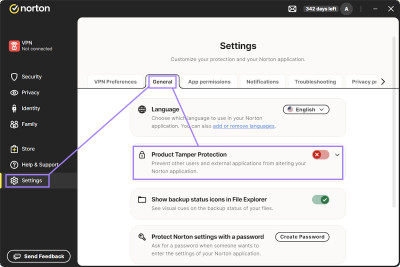
- Go to your computer’s search bar and open “Task Manager.”
- In the “Startup apps” section, click on AvLaunch.exe and click Disable.

That’s it. You’ll no longer experience Norton VPN popping up on your screen.
Is Norton VPN worth it: final thoughts
Norton VPN has improved drastically over the years, implementing strong security features and going through multiple independent audits. Plus, compared to a few years back, Norton VPN servers can now easily bypass geo-restrictions on major streaming sites.
However, there are some areas for improvement. For example, the speed retention rates with the WireGuard protocol could be better. Still, most streaming services showed no lagging at all unless the servers were far away from the testing location.
The bottom line is that Norton VPN is a great choice for everyday use and geo-restriction bypassing. It has advanced features suitable for both individual users and families, including malware protection, rotating IP servers, and dark web monitoring, making it an all-around cybersecurity solution.
Frequently asked questions
Yes, Norton VPN has servers in 67 countries, offers advanced security features, and an audited no-logs policy, making it a trustworthy service. Aside from a secure VPN, it helps keep you safe with malware protection and dark web monitoring. Plus, it showed no DNS or IP leaks during my tests.
NordVPN is faster than Norton VPN, retaining nearly 82% of initial connection speeds on average compared to Norton’s 73%. Plus, NordVPN has servers in 129 countries, while Norton only in 67 countries.
Whether you want to leave Norton VPN on at all times or not depends on what you’re doing online. Using a VPN is especially useful when you want your online activities to be private on public Wi-Fi networks or when you want to bypass geo-restrictions.
The difference between Norton VPN and Norton 360 is that Norton VPN is a standalone VPN solution. Meanwhile, Norton 360 is an all-in-one security option that comes with an antivirus, VPN, and other features.
Norton VPN offers servers in 67 countries only and doesn’t support Linux. Plus, the performance could be optimized for bandwidth-heavy activities, like 4k streaming or torrenting. Other than that, Norton VPN is a strong tool for privacy protection that shows no IP leaks and offers malware protection.